RA Vision
Turns any LED video wall into a live drag-racing scoreboard — ready boards, live splits, results, winner callouts, sponsor rotation and instant replay, driven straight from RA Command Drag
Every system we sell is configured for the facility it runs at. Tell us about your track and we'll spec the right setup and price it, usually within one business day.
Request a QuoteSpecifications
| Platform | Windows desktop (.NET) |
| Timing Integration | RA Command Drag live event stream |
| Walls | Unlimited - one full-screen output per display |
| Built-in Layouts | 12, plus custom JSON templates |
| Layout Geometry | Fractional 0-1 coordinates, resolution independent |
| Image Formats | PNG, JPG, BMP, GIF |
| Video Formats | MP4, MOV, M4V, WMV, AVI, MKV |
| Reference Build | Vision 3000 - 128x128 panels, 4x2 grid, 512x256, 2:1, 8ft x 4ft |
| Connectivity | On-site only - no cloud service or internet dependency |
| Discipline | Drag racing |
Features
- Live lane data straight from RA Command Drag - no polling, no refresh
- Independent per-lane channels so one dropping never blanks the rest
- Automatic layout switching - idle, staged, running, results, hands-free
- Unlimited walls: left-lane, right-lane and tower walls from one PC
- Twelve built-in layouts including race mode, lane focus and replay overlay
- Custom layouts as JSON files - drop one in the folder and it appears
- Resolution independent - one layout renders correctly on any panel grid
- True-aspect letterboxing rather than stretching
- Automatic WIN banner, red-light and breakout indicators, margin of victory
- Distance-aware boards for 1/8, 1000ft and 1/4 mile classes
- Sponsor rotation of stills and video clips between runs
- Live folder watch - drop a logo in mid-event and it is on the wall
- Instant replay queue that clears itself when empty
- Always-on-top operator console for every wall
- Panel calculator - resolution, dimensions, area and power draw
- Preview mode: every wall in a window on your desktop
- Demo mode: scripted race loop for trade shows and training
- Self-healing feed with automatic reconnect
- Runs entirely on-site - no cloud, no internet required
Description
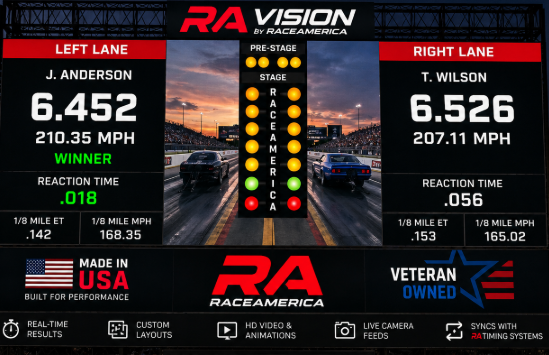
RA Vision turns any LED video wall into a live drag-racing scoreboard. It takes the timing feed straight from RA Command Drag and drives one or many walls — ready boards, live splits, results, winner callouts, sponsor rotation and instant replay — with layouts that switch themselves as the race progresses.
Live race data
- Direct RA Command Drag integration. Subscribes to the live event stream — data lands on the wall the instant the timing system publishes it.
- Independent per-lane channels. Left lane, right lane and race-wide state each run on their own subscription, so one channel dropping never blanks the rest of the wall.
- Legacy compatibility mode. A single-channel mode keeps RA Vision working against older installations that don't publish the split channels.
- Full run data. Driver name, car number, hometown and state, dial-in, reaction time, 60 ft, 330 ft, 660 ft + MPH, 1000 ft + MPH, and final ET and MPH.
- Race context. Class, race mode, round label, event name and venue, margin of victory, and the next-up pairing between runs.
- Status callouts. Red light, breakout and winner are surfaced automatically — including an animated WIN treatment on the lane board.
- Distance-aware boards. 1/8, 1000 ft and 1/4 mile classes show only the split rows that apply.
- Operator-formatted numbers. Times and speeds appear exactly as the timing system formats them, so the wall always matches the tower.
Layouts and boards
- Twelve production layouts out of the box — Race Mode, Lane Focus (left/right), Race + Sponsors, Race + Replay Overlay, and per-lane boards (Ready, Live, Results — left and right).
- Three-stage lane board. A single board carries the whole run: Ready (driver + dial-in), Live (splits filling in beside big ET/MPH), Results (final ET, MPH, splits and the winner badge).
- Composable zones. Header, lane cards, per-lane boards, margin, next-up, winner banner, sponsor strip, sponsor panel, media rotator, replay overlay and status footer.
- Custom layouts without a rebuild. Every layout is a JSON file read at startup from the
Layoutsfolder — add, edit or remove templates and they appear in the picker. - Fractional geometry. Zones are positioned in 0–1 coordinates, so one template is pixel-correct on any wall size or panel grid.
- True-aspect letterboxing. The board renders at its real aspect ratio and is centred with black bars rather than stretched, so nothing distorts.
- Instant switching. Templates swap live — no restart, no black frame — from the operator console or the 1–9 hotkeys on each wall.
Layout automation
- Race-state driven. Map each race state — idle, staged, running, results — to a layout, and the wall drives itself for the whole event.
- Per-wall rules. Each wall gets its own mapping, so a left-lane wall and a right-lane wall can follow the same race with different boards.
- Smart idle. An empty staging slot resolves to sponsors between runs instead of an empty ready board — and snaps back the moment a real car stages.
- Synchronised results hold. After a run, every wall holds the result for a configurable time and returns to idle together — no wall dropping out of step.
- Transition debounce. A configurable hold prevents flicker when the timing system emits rapid state changes.
- Fail-safe on feed loss. If the timing feed drops, walls fall back to the idle/sponsor board rather than freezing on a stale run.
Multi-wall installations
- As many walls as you have displays. Each wall is its own full-screen output with its own layout, automation rules and name.
- Per-wall display assignment. Pick the monitor from a list and move the wall onto it live; a removed display falls back to primary instead of going black.
- Shared media, independent boards. One sponsor roster and one replay queue serve every wall, while layouts and automation stay per-wall.
- High-DPI correct placement. Walls are positioned in physical pixels, so they fill mixed-DPI monitors edge to edge.
Sponsors and media
- Full-screen idle rotation. Between runs the wall rotates sponsor stills and video clips.
- Mixed image and video. PNG, JPG, BMP and GIF stills plus MP4, MOV, M4V, WMV, AVI and MKV clips — stills dwell for a set time, videos play through.
- Live folder watch. Add or remove a sponsor mid-event and the rotation picks it up automatically — no restart.
- Per-zone tuning. Dwell time, mute and a maximum clip length are set per layout.
- Bad file tolerance. An unplayable clip is skipped without stopping the rotation.
- Placement options. A bottom banner strip, a vertical side panel, in-lane logo tiles or the full-board idle rotator.
Instant replay
- Operator replay queue. Add clips, re-order them, skip playback or clear the queue.
- Self-clearing overlay. The replay zone appears when a clip is queued and disappears when the queue empties, returning the wall to its normal board.
- Any wall, any layout. A queued clip plays on every wall whose active layout includes a replay zone.
Operator console
- One window, every wall. Always-on-top controls for each wall: add/remove, rename and display assignment.
- Layout picker. Live template selection for each wall, alongside the hotkeys on the walls themselves.
- Sponsor manager. Browse, add, remove and open sponsor media without leaving the app.
- Automation editor. Set race-state mappings, debounce and results hold, with the current race state shown live.
- Feed status lights. Per-channel connection indicators and status text at a glance.
- Configurable folders. Point the sponsor and replay folders at a local drive or a shared network folder.
Video wall configuration
- Describe your wall, not your pixels. Enter panel resolution, panel physical size, wattage and the grid layout.
- Computed installation figures. Total render resolution, wall dimensions in metric and imperial, surface area, panel count and total power draw.
- Any panel grid. Defaults ship for the Vision 3000 build (128×128 panels, 4×2, 512×256, 2:1, 8 ft × 4 ft), and any other configuration is a few fields away.
Deployment and reliability
- Windows desktop application. Modern .NET.
- Fully on-site. Talks only to the local timing system — no cloud service, no internet dependency at the track.
- Automatic reconnection. A timing-system restart doesn't require a wall restart; RA Vision reconnects on its own.
- Persistent setup. Walls, displays, layouts, automation rules and folders are remembered between launches, per machine.
- Resilient by design. A malformed layout file, a missing monitor or a bad media file degrade gracefully instead of taking the wall down.
- Startup options. Point at any timing host, force compatibility mode, or launch straight into preview or demo from the command line.
Preview and demo
- Preview mode. Every wall opens as a resizable window rather than full screen — build and rehearse an entire multi-wall show on a laptop.
- Demo mode. A scripted race loop drives the full race and idle lifecycle with sample drivers and times, so the product demos anywhere with no timing hardware attached.