
RA Command AutoCross Event Management Software
Model: RA-AutoX
Contact for Pricing
Run your whole autocross event from one Windows app — live times off the 3850, a run order that keeps the course full, and class and PAX scoring ready the moment the last car crosses
Every system we sell is configured for the facility it runs at. Tell us about your track and we'll spec the right setup and price it, usually within one business day.
Request a QuoteSpecifications
| Platform | Windows 10/11 desktop |
| Timer Connection | RaceAmerica 3850 over serial, 9600 8N1 |
| Cars On Course | Up to 4 on a single start/finish beam |
| Scoring Modes | Best Single or Sum of Best |
| Cone Penalty | Configurable seconds per cone |
| Indexing | PAX index per class, fully editable |
| Classes | SCCA-style starter set, editable |
| Data Storage | Local database on the timing laptop |
| Connectivity | Fully offline - no internet required |
| Themes | Light, Dark, System |
| Discipline | Autocross / Solo |
Features
- Direct connection to the RaceAmerica 3850 hardware timer over serial (9600 8N1)
- Up to four cars on course at once on a single start/finish beam
- Finishes auto-recorded to the oldest car in FIFO order - no operator input
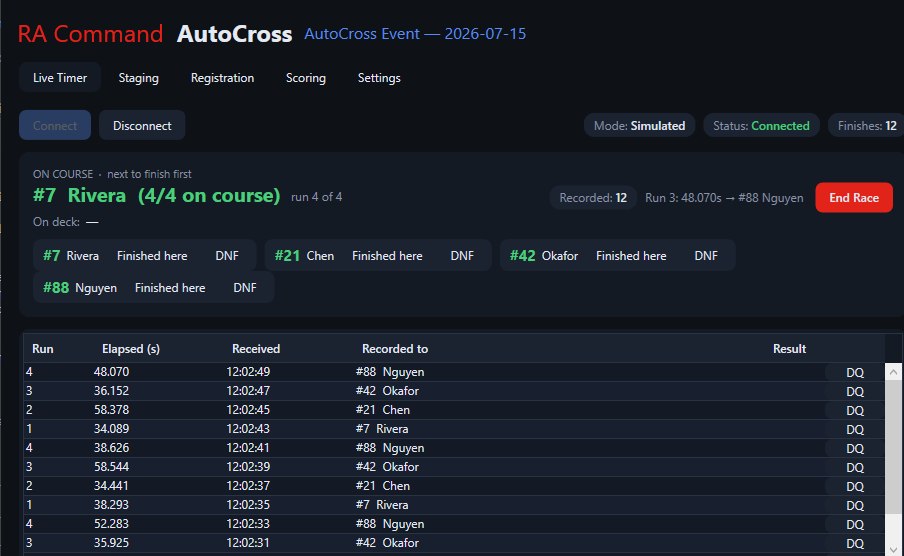
- On-course Slots panel showing every car in the order they will finish
- One-click reassign, DNF, and DQ straight from the live feed
- Built-in timer simulator for training and setup without hardware
- Run order with automatic cycling and an enforced per-competitor run cap
- Requeue a car off course with no run counted
- Crash-safe - run order saved on every change and restored on relaunch
- Competitor registration by number, class, name, and vehicle
- Manual run entry for backup timing, protests, and corrections
- Class standings and overall PAX ranked live as runs come in
- Best Single or Sum of Best scoring, switchable per event
- Configurable cone penalty that recalculates penalized times everywhere
- Editable SCCA-style classes and PAX indexes seeded on first launch
- Works fully offline - local database, no cloud account
- Light, Dark, and System themes
Description
Run your whole autocross event from one Windows app. Live times off the RaceAmerica 3850 hardware timer, a run order that keeps the course full, class and PAX scoring that's ready the moment the last car crosses. No internet required, no spreadsheets.
Live timing
- Direct 3850 hardware timer connection — reads the data-log feed over serial (9600 8N1); times appear the instant a car crosses.
- Built for a single start/finish beam — up to four cars on course at once, each finish auto-recorded to the oldest car in the FIFO order, so times land on the right driver without operator input.
- On-course Slots panel — see every car on course at a glance, in the order they'll finish.
- One-click corrections — reassign a mis-matched finish to the correct slot, record a DNF, or DQ a bad time (a pass that invalidated the field, a missed beam) right from the live feed.
- Never blocks the event — a timer that isn't connected surfaces as a status, not a crash; you can keep working and enter times by hand.
- Practice without hardware — a built-in timer simulator runs a full mock event for training staff or setting up before you ever unpack the timer.
Staging & run order
- Build and reorder the run order with up/down controls; release the on-deck car with Start.
- Requeue pulls a car back off course with no run counted — for a false start, a mechanical, or a driver who wasn't ready.
- Automatic cycling — "requeue after run" sends each driver to the back of the queue until they've taken their allotted runs, then drains them from the field.
- Enforced run cap — the per-competitor run limit is honored automatically, counting runs already in the database.
- End Race clears the course cleanly and re-arms for the next heat.
- Crash-safe — the run order is saved on every change and restored exactly on relaunch. Close the laptop mid-event and pick up where you left off.
Registration
- Full competitor management — car number, class, name, and vehicle, with instant search-friendly listing by number, class, and name.
- Manual run entry — add, edit, or delete runs by hand (time, cone count, status) for backup timing, protests, or corrections.
- Per-run status — clean, cone penalties, DNF, DQ; only counting runs feed the results.
Scoring
- Class standings and overall PAX, ranked live as runs come in — no separate scoring pass.
- Two scoring modes — Best Single (fastest penalized run) or Sum of Best (all counting runs totaled), switchable per event.
- Configurable cone penalty — set the seconds-per-cone your club uses; penalized times recalculate everywhere.
- PAX index per class for cross-class comparison, with a starter set of SCCA-style classes (Street, Street Touring, Street Modified, Novice, Fun/Exhibition) seeded on first launch and fully editable for your sanctioning body and season.
- Cone totals per competitor carried through to the standings.
Event setup
- Event details — name, date, venue, notes.
- Event rules in one place — cone penalty, runs per competitor, max cars on course, scoring mode.
- Live timer settings — switch transport, COM port, and baud rate and it reconnects immediately; no restart, no lost run order.
- Light, Dark, and System themes that switch instantly — readable in a trailer at noon or a tower at dusk.
Built for the trailer
- Windows desktop app (Windows 10/11) — installs and runs locally.
- Works fully offline. Your event data lives in a local database on your machine; no cloud account, no connectivity gamble at the venue.
- Fast, native UI designed for a timing laptop and a long day.
Coming soon
- Publishing results to results.raceamerica.com
- Online registration and competitor import
- Additional timer transports (WiFi, T-Link/RF)
- Official PAX/RTP index tables and championship points standings
- Printed results, elims/qualifying brackets, and multi-event management