RA Monitor — Drag
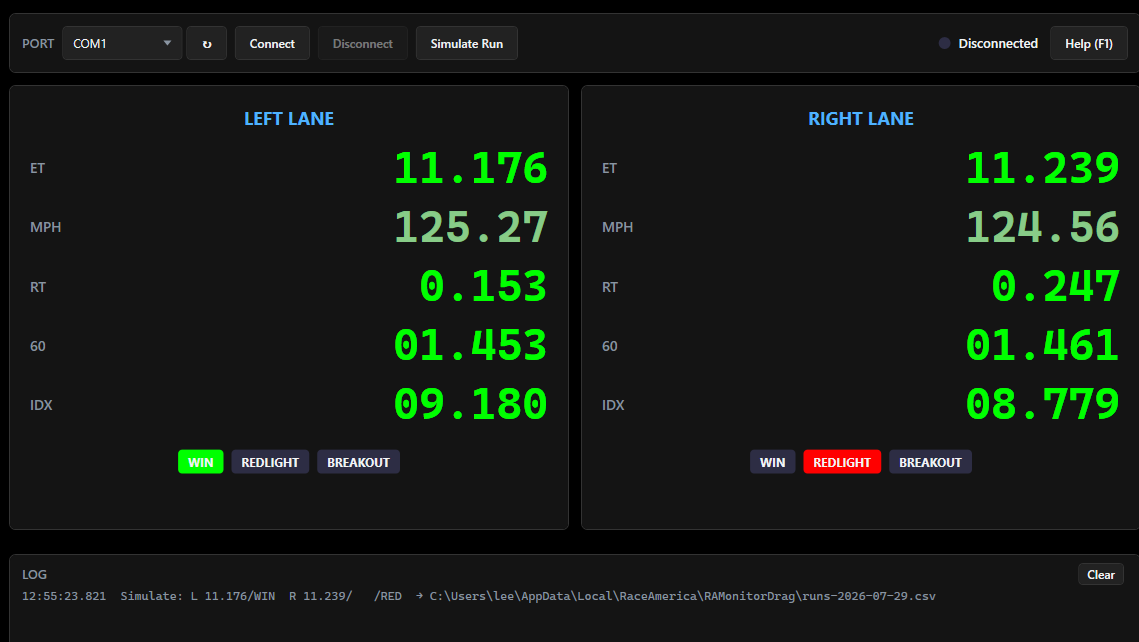
Windows scoreboard and run logger for the RaceAmerica 2650 — live ET, MPH, reaction time, 60-foot, and win/red-light/breakout for both lanes, with every run saved to a daily spreadsheet file
Every system we sell is configured for the facility it runs at. Tell us about your track and we'll spec the right setup and price it, usually within one business day.
Request a QuoteSpecifications
| Works With | RaceAmerica 2650 wired drag-strip timer |
| Connection | Serial (COM) port - USB-to-serial adapters supported |
| Lanes | Two |
| Data Shown | ET, MPH, reaction time, 60-foot, index/dial-in, win / red-light / breakout |
| Results Log | Daily CSV, one row per run |
| Operating System | Windows 10 / Windows 11 (64-bit) |
| Timer Control | None - listen-only; the 2650 keypad is the only control surface |
| Licensing | One-time activation, per PC |
Features
- Live two-lane scoreboard - ET, MPH, reaction time, 60-foot, and index/dial-in side by side
- Automatic WIN / RED-LIGHT / BREAKOUT indicators per lane
- Win logic that matches what the 2650 decided
- High-contrast display readable across a tower or projected on a wall
- Results stay up between rounds
- Every run logged automatically to a daily CSV that opens in Excel
- 13 columns per run, both lanes, with ISO-8601 timestamps
- New log file at midnight - yesterday's is closed and left untouched
- Log can be opened while the app is still running
- Per-operator results folders
- Listen-only - never sends a command to the timer
- No serial settings to get wrong; pick the COM port and connect
- Works with USB-to-serial adapters, with live port re-scan
- At-a-glance connection status light
- Millisecond-timestamped activity log with sensor status and firmware reporting
- Sensor alignment, cable, and wiring faults captured in the log
- Simulate Run for training and installation checks without hardware
- Searchable in-app Help (F1), no internet needed
- Windows 10/11 64-bit, one-time per-PC activation
Description
Put your 2650 on the big screen — and keep every run.
RA Monitor — Drag turns any Windows PC into a live two-lane scoreboard and permanent results log for the RaceAmerica 2650 drag-strip timer. Plug in a serial cable, click Connect, and every run appears on screen and lands in a spreadsheet-ready file.
Live two-lane scoreboard
- Full run data, both lanes, instantly — ET, MPH, reaction time, 60-foot, and index/dial-in for the left and right lane side by side.
- Big, high-contrast display built to be read from across the tower or projected onto a wall screen.
- Automatic WIN / RED-LIGHT / BREAKOUT indicators that light per lane the moment a run comes in.
- Win logic that matches your timer — red-light loses first, then breakout, then lower ET takes it. What the screen shows is what the 2650 decided.
- Results stay up between rounds so spectators and racers can read the last pass while the next pair stages.
Automatic run logging
- Every run saved, automatically — no button to press, nothing to remember at the end of the day.
- Daily CSV files that open directly in Excel or any spreadsheet tool.
- Full detail per run — timestamp plus ET, MPH, RT, 60-foot, index, and status for both lanes, in 13 columns.
- Precise timestamps (ISO-8601 with time zone) for cross-checking against video, photos, or other systems.
- New file at midnight, automatically. Yesterday's log is closed and left untouched.
- Open the log while the app is still running to check results.
- Per-operator logs — each Windows user on the PC keeps their own results folder.
Zero-risk, zero-configuration operation
- Listen-only by design. RA Monitor never sends a command to your timer. The 2650 keypad remains the only control surface, so nothing on the PC can interfere with a race in progress.
- No serial settings to get wrong. Baud rate, parity, and handshaking are locked to the only mode the 2650 uses. Pick the COM port and connect — that's the entire setup.
- Works with USB-to-serial adapters on modern laptops with no legacy COM port.
- Live port re-scan — plug the adapter in after starting the app, no restart needed.
- At-a-glance status light — gray, orange, green, or red tells you the connection state without reading anything.
Diagnostics and troubleshooting
- Millisecond-timestamped activity log showing everything the application sees on the wire.
- Sensor status reports from the timer, decoded.
- Firmware version reporting — know exactly what your 2650 is running.
- Sensor alignment faults captured in the log automatically, with no operator action.
- Cable and wiring faults are visible, not silent — bad data on the line shows up in the log instead of just producing nothing.
- Write errors are reported plainly, with the reason, if the log cannot be written.
Demo and training mode
- Simulate Run generates a realistic result — no timer, no cable, no track required.
- Train operators on the display before race day.
- Prove the installation works on a new PC, results file included.
- Demonstrate the scoreboard to a track, a sponsor, or a customer from a laptop on a desk.
Built-in help
- Searchable in-app Help covering setup, the live display, run logging, the hardware, and troubleshooting — one keypress (F1) away, available at the track with no internet connection.
- Complete printed-quality user manual included.
Installation and licensing
- Standard Windows installer, or a self-contained build that runs with nothing else to install.
- Windows 10 and Windows 11 (64-bit).
- Simple one-time activation — copy your machine ID, send it to RaceAmerica, paste the key back. Licensed per PC and never asked for again.
What RA Monitor — Drag does not do
RA Monitor — Drag is a scoreboard and logger. It does not start the tree, abort runs, or change any setting on the 2650 — the timer's keypad is the only control surface. It does not run classes, registration, or eliminations.
Need PC-driven race control? Tracks that want to start the tree, align sensors from the screen, and manage brackets and drivers from the PC should ask about the 2750 XL Wireless or 2900 timer with RA Command Drag.
Who it's for
- Small tracks and test-and-tune nights — give racers a real scoreboard without replacing the timer you already own.
- Bracket and points series — every pass logged, so end-of-season records are already in a spreadsheet.
- Driving schools and rental operations — hand customers their times from the log at the end of the session.
- Anyone tired of writing times on a clipboard.